
Your digital footprint is the trail of data you leave online - intentionally or unintentionally. This data can be used by advertisers, employers, or even hackers. But you can take control. Here are five ways to reduce your footprint and protect your privacy:
Use a privacy-first browser: Block trackers, cookies, and fingerprinting methods with tools like MASQ Browser.
Switch to a decentralized VPN: Hide your IP and encrypt your activity without centralized logging.
Choose independent search engines: Avoid search history tracking with options like Timpi Search.
Delete old accounts: Remove unused accounts to reduce stored data and minimize breach risks.
Adjust privacy settings: Limit app and platform data sharing and block unnecessary permissions.
Take simple steps to protect your online presence and manage your data effectively.
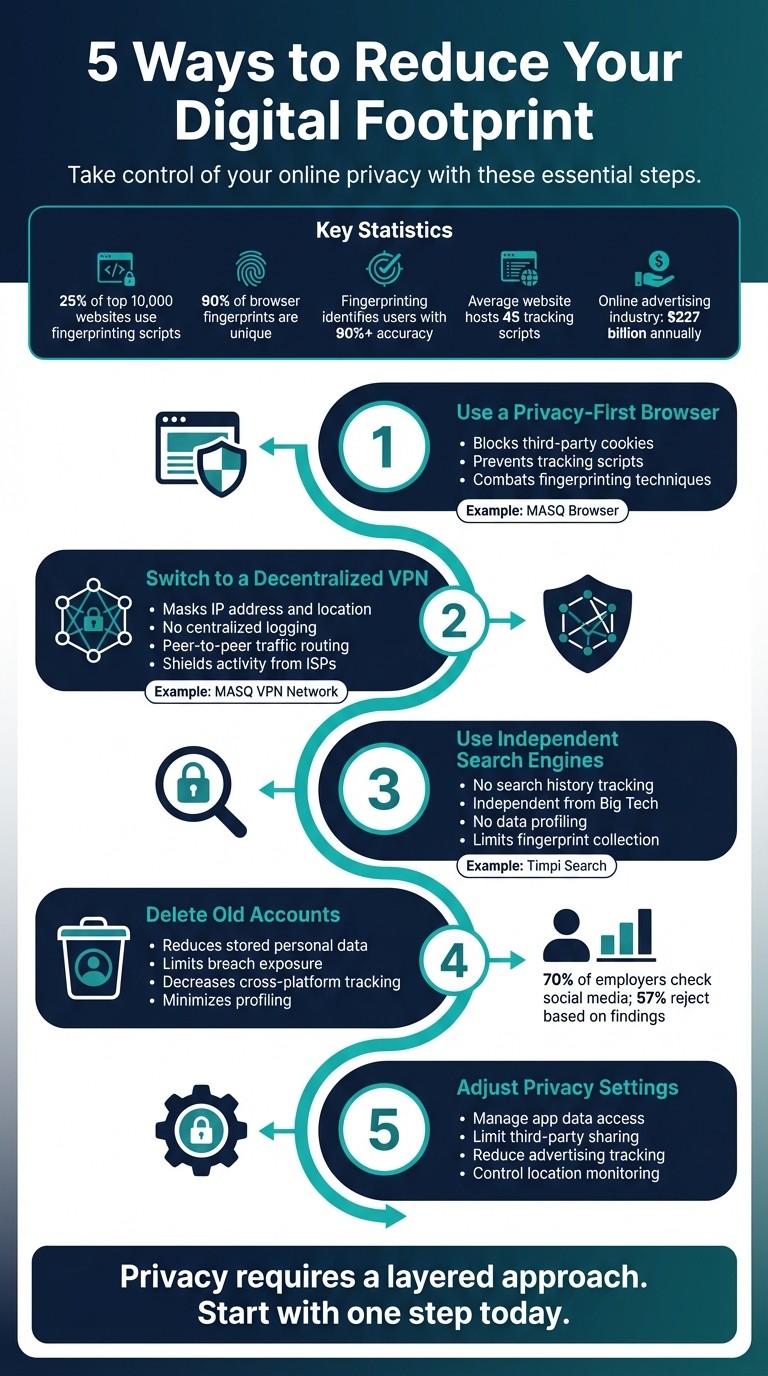
5 Steps to Reduce Your Digital Footprint and Protect Online Privacy
How To Protect Your Digital Footprint
1. Use a Privacy-First Browser like MASQ Browser
Your browser is your gateway to the internet, making it a crucial tool for controlling your digital footprint. Many traditional browsers track your online activities - recording the sites you visit, the links you click, and even how long you stay on a page. This data is often used to create detailed profiles of your interests and behaviors. By blocking these tracking mechanisms, a privacy-first browser becomes your first line of defense.
Privacy-first browsers operate differently. They are built to stop many of the tracking tools that mainstream browsers allow by default. This includes blocking third-party cookies, tracking scripts, and fingerprinting techniques. For context, a 2020 study found that around 25% of the top 10,000 websites use fingerprinting scripts to track users. Additionally, research from 2016 revealed that 90% of 100,000 collected browser fingerprints were unique.
Blocks Tracking and Data Collection
Privacy-focused browsers, like MASQ Browser, block trackers right at the source. They prevent third-party cookies - commonly used by ad networks to follow your activity across different websites - and employ content blockers to stop tracking scripts and malware from running. They also combat fingerprinting by masking or randomizing device details such as screen resolution, installed fonts, and timezone. This makes it significantly harder for websites to identify you. In fact, fingerprinting techniques can identify users with over 90% accuracy, even without cookies or logins.
"Any script running in your browser can silently build a fingerprint of your device without you even knowing about it." – The Tor Project
By blocking these invasive techniques, privacy-first browsers reduce the data available for networks to build profiles on you.
Prevents Corporate Profiling
Using a browser that doesn’t collect your data means you stop being the product. MASQ Browser, for instance, is supported by a community-driven model rather than selling user information. It actively blocks the tracking scripts that ad networks rely on to monitor your behavior. This approach limits corporate profiling and protects your privacy by cutting off the data collection that fuels targeted advertising.
Supports Decentralized Web Access
Another advantage of MASQ Browser is its support for decentralized web access. It can resolve Handshake decentralized domains (.HNS), allowing you to visit censorship-resistant websites that traditional browsers might not display. This decentralized approach also makes it harder for ISPs or websites to trace your connection’s origin, further safeguarding your privacy. Unlike incognito mode - which only prevents local history from being saved - privacy-first browsers actively block the tracking methods used to profile you.
Next, we’ll dive into how a decentralized VPN network can further protect your online privacy.
2. Switch to a Decentralized VPN Network
Once your browser is secure, the next step in safeguarding your online presence is protecting your connection. Your IP address is a key part of your passive digital footprint - information that gets shared automatically every time you browse the web. While traditional VPNs rely on centralized servers, many of these services log user activity, which can compromise privacy. A decentralized VPN network, like the MASQ VPN Network, offers a more secure alternative by removing the risks associated with centralized systems. Let’s dig into how this decentralized approach enhances your privacy.
Masks Your IP Address and Location
VPNs work by encrypting your internet data and routing it through a secure tunnel, effectively hiding your IP address and location. This stops websites and trackers from pinpointing your geographic location or gathering data about your online activities.
Avoids Centralized Logging with Peer-to-Peer Traffic Routing
The MASQ VPN Network stands out by using a decentralized, peer-to-peer protocol that eliminates centralized logging. Instead of relying on a single server, it routes traffic through a network of community-supported nodes. Traditional VPN providers often store user data, creating a digital trail that can be exploited. As LevelBlue aptly puts it, "A digital footprint is permanent, and deleting it is next to impossible." By distributing traffic across multiple nodes, decentralized VPNs make it significantly harder for ISPs, advertisers, or even hackers to monitor your activity or build a profile of your behavior. This approach ensures that no central authority holds a record of your browsing history, aligning perfectly with the goal of maintaining stronger, layered privacy protections.
Shields Your Browsing Activity from ISPs
Your internet service provider (ISP) has the capability to monitor every site you visit. VPNs, particularly those using decentralized networks, encrypt your traffic and make it unreadable to ISPs. This is critical because your browsing habits can unintentionally reveal personal details, like medical conditions, religious views, or political preferences. By routing your data through a decentralized network, you gain an extra layer of protection against such intrusive monitoring.
Next up, we’ll look at how independent search engines help keep your search queries private.
3. Use Independent Search Engines like Timpi Search
Your search habits reveal a lot about you - probably more than you realize. Most major search engines rely on ad-driven models, which means they collect and analyze your data to serve targeted ads. As GlyphSignal explains, "Search is where tracking is most intrusive. Google builds detailed profiles from your search history, location, and browsing patterns." This makes it all the more important to consider alternatives that prioritize your privacy.
No Search History Tracking
Privacy-first search engines like Timpi Search don't keep a record of your queries. Unlike big-name search engines that tie every search to your IP address or account, independent options erase your searches as soon as they're processed. This means no lingering digital footprint.
Independent from Big Tech
Timpi Search operates its own search index, ranking among the top five globally. By not relying on data or infrastructure from tech giants, it ensures your searches remain outside the massive data-collection systems these companies often use.
No Data Profiling
Traditional search engines build detailed profiles by combining your search history, location, and other data. Timpi Search, on the other hand, skips this entirely. By not storing your queries or associating them with your identity, it blocks advertisers from creating targeted profiles based on your activity.
Less Data Collection Overall
Big search engines don’t just collect your search terms - they also gather technical details like browser fingerprints, which are unique identifiers based on your device’s characteristics. Timpi Search significantly limits the collection of these details, making it much harder for third parties to track you across the web.
As part of the MASQ ecosystem, Timpi Search works seamlessly with its privacy-first browser and decentralized VPN network, offering a comprehensive approach to keeping your online activity private.
4. Delete Old Accounts and Limit New Ones
Unused accounts can expose your personal data and increase your vulnerability to security risks. Taking the time to delete old accounts and being selective about creating new ones can go a long way in protecting your privacy.
Reduces Stored Personal Information
Every account you create stores bits of your personal data, such as IP addresses, purchase history, and more, which together form a digital profile about you. Deleting old accounts removes these data points from circulation and works well alongside privacy-focused browsing and decentralized VPNs. If an account deletion option is hard to find (which it often is), you can manually clear your profile information and revoke any app permissions tied to the account. This ensures less of your data lingers online.
Limits Data Breach Exposure
Inactive accounts are a hidden risk, often referred to by security experts as a "forgotten attack surface." If these accounts are hacked, your credentials could be exposed - especially if you’ve reused passwords. To check if your email has been involved in any data breaches, you can use tools like "Have I Been Pwned". This simple step can help you identify compromised accounts and take action.
"Public data is not only a privacy issue. It is authentication fuel for impersonation and recovery abuse." - Hacked.com
Decreases Tracking Across Platforms
The fewer accounts you maintain, the harder it becomes for companies to track your activity. Avoid using linked logins like "Sign in with Google" or "Sign in with Facebook", as these options often share additional data about your browsing habits. For one-time purchases, choose guest checkout instead of creating a new account.
Minimizes Account-Based Profiling
Data brokers and other entities frequently scrape information from your accounts - especially social media - to build profiles used for targeted advertising or even hiring decisions. For example, 70% of employers check social media during the hiring process, and 57% of job seekers have been rejected based on online information. To find forgotten accounts, search your email inbox for keywords like "Welcome to" or "Verify your email." Tools like JustDelete.Me can also simplify the process by linking directly to account deletion pages, which are often hard to locate.
5. Adjust Privacy Settings and Limit Data Sharing
Even with secure browsers and decentralized VPNs in place, refining your privacy settings adds another layer of protection to your digital life.
Many apps and platforms collect far more data than they need. Tweaking privacy settings - often buried in menus - can be a powerful way to safeguard your information.
"Privacy settings aren't just toggles buried in menus - they're your first line of defense." - Arjun Bhatnagar, CEO, Cloaked
Manage App Data Access
Start by reviewing app permissions for sensitive access, like your camera, microphone, and location. In your browser's Site Settings, block these permissions by default. On your mobile devices, check which apps have access to your contacts, photos, and other personal data. You can also visit myaccount.google.com/permissions to revoke access for apps you no longer use.
Limit Third-Party Data Sharing
Beyond app-specific permissions, adjust platform settings to reduce how much data is shared with third parties. Social media platforms, for example, often share your data with advertisers unless you opt out. On Facebook and Instagram, use the Privacy Checkup tool to limit post visibility to "Friends" only. LinkedIn offers Data Privacy settings that allow you to restrict third-party data sharing. Additionally, consider using services like DuckDuckGo Email Protection or SimpleLogin to create masked emails when signing up for new accounts. This prevents data brokers from easily linking your accounts to your real identity.
Reduce Advertising Tracking
The online advertising industry generates over $227 billion annually, with the average website hosting 45 tracking scripts. To combat this, configure your browser to delete cookies upon exit and enable strict tracking protection. On iOS devices, activate App Tracking Transparency to block cross-app tracking. Android users can reset their Advertising ID monthly to disrupt the profiles advertisers build about them. Browser extensions like uBlock Origin and Privacy Badger can also automatically block tracking scripts.
Limit Location and Activity Monitoring
Google's Location History and Web & App Activity features can create detailed logs of your movements and behavior. Visit myactivity.google.com to delete your history and set auto-delete intervals to every three months. Disable real-time tagging and location sharing on social apps like Facebook and Instagram. If you're using iOS, go to Settings > Safari and enable "Hide IP Address" to block trackers from identifying your location. These small changes make it harder for companies to track your movements and compile detailed profiles.
Conclusion
Your digital footprint isn't just about what you post online - it also includes the data quietly gathered about you. Techniques like browser fingerprinting can identify individuals with over 90% accuracy, making it essential to address both the information you actively share and the tracking that happens behind the scenes.
To reduce your digital footprint, you need a layered approach that tackles multiple aspects of online privacy. Here’s a quick recap of the five methods discussed in this guide:
Privacy-focused browsers: These help mask device fingerprints, making it harder for websites to track you.
Decentralized VPNs: They hide your IP address and encrypt your traffic without relying on centralized logging.
Independent search engines: These prevent your queries from being stored and monetized.
Deleting old accounts: This removes sensitive data from servers that could be vulnerable to breaches.
Adjusting privacy settings: This limits the amount of information platforms can share with third parties.
Privacy isn’t a "set it and forget it" process - it requires regular maintenance. Make it a habit to revisit your privacy settings, as companies often update their policies to favor more data sharing. Set a monthly reminder to review your accounts, delete any you no longer use, and avoid using "Sign in with Google/Facebook" options, which allow platforms to consolidate your data across services. Segmenting your online activities - like using different browsers for specific tasks - can also help prevent trackers from building a complete profile of your behavior.
With MASQ’s integrated browser, decentralized VPN, and independent search engine, protecting your privacy becomes part of your everyday browsing. As MASQ Network puts it, "The more the network grows, the stronger and more powerful the browsing experience will become - with all netizens sharing borderless internet freedom worldwide".
Start making small changes today. Every step you take strengthens your defenses, making it harder for trackers to follow you, advertisers to target you, and data brokers to profit from your information. Your digital footprint is in your hands - you just need the right tools and habits to manage it effectively.
FAQs
What’s the fastest way to shrink my digital footprint?
Clearing out your digital footprint can start with a simple step: deleting your Google activity history and unused accounts. Head to your Google settings and erase your search, location, and YouTube history. For unused accounts, tools like JustDeleteMe can help you locate and delete them easily. To take your privacy further, explore tools like MASQ - it offers a secure browser, decentralized VPN, and independent search engine all in one, helping you reduce tracking and data collection effectively.
Does a decentralized VPN slow down internet speed?
Decentralized VPNs distribute traffic across multiple nodes, which can help maintain consistent speeds by avoiding bottlenecks. However, this setup might also introduce some latency because of the extra routing steps involved. The overall impact on speed depends on factors such as the network's current load and the quality of the nodes being used.
How can I find and delete accounts I forgot I created?
Begin by taking a closer look at your digital footprint. Search your email inbox for clues - look for account confirmations, password reset emails, or notifications from platforms you might not remember using. These can help you track down accounts you’ve forgotten about.
You can also use specialized tools to scan for accounts connected to your email address. Once you’ve identified these accounts, visit each platform’s settings to deactivate or delete them. If deletion isn’t straightforward, explore the platform’s help section for removal options or reach out to their support team for assistance.
Making it a habit to review your accounts regularly is a smart move. It’s an easy way to safeguard your privacy and reduce the risk of your data being exposed.